Backlot : An internal CMS for a streaming service

Getting a series to release without the back and forth.

Films and series move through Backlot from upload to release in every region they go to. Two roles with separate permissions work in it: editors prepare content and metadata, publishers review it and decide what goes live. I designed both workflows end to end, including an AI check that flags likely rejections before the editor submits.
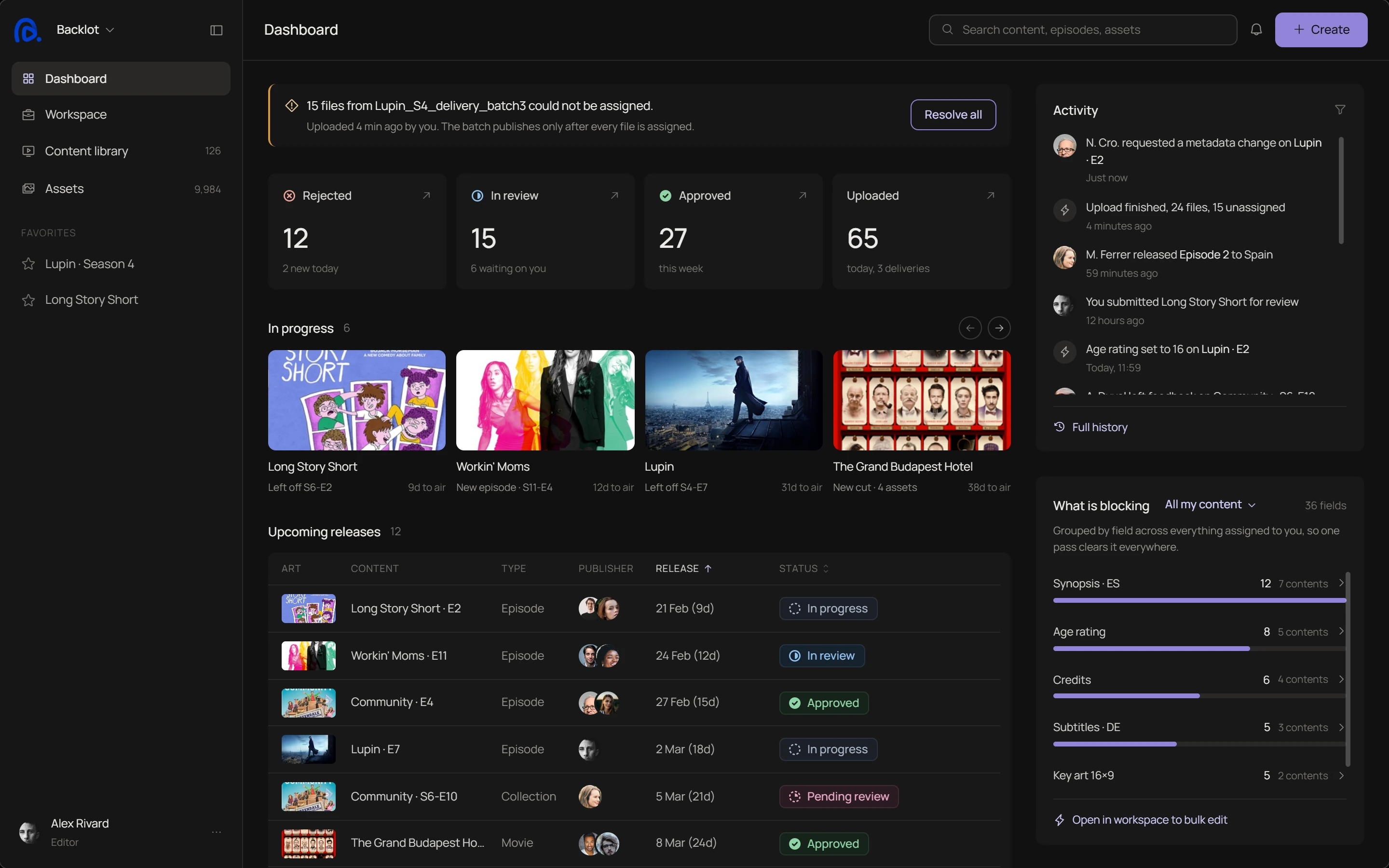
Backlot editor dashboard
Context
The take-home that got me hired for my last role, rebuilt and extended.
Category
B2B SaaS, Enterprise CMS
My Role
Product Designer, end to end
Date
2026
01

Learning the domain

The system

I started by mapping where Backlot sits in the content supply chain: between ingest (uploads, APIs, studio pipelines) and media processing and delivery. Most steps around it are automated. Editorial work and approval happen in the CMS, so that is where workflow design matters most.

IngestManual uploads, APIs, studio pipelines
CMSBacklot. Metadata, review and approval
Media processingFiles get prepared for playback
DeliveryContent reaches viewers
Region first

Almost every field changes by region: title, synopsis, age rating, release date, rights window, even the attached audio and subtitles. One item holding every region's version would mean editing them all at once.

So the region comes first. The editor picks one, and everything under it (series, seasons, episodes, assets) shows for that region only.

The tree

Inside a region, the next question is what a single piece of content is. A film is one item. A series is a tree: seasons under the series, episodes under each season, files under each episode, and every level has its own metadata and status.

Some values roll up the tree. In each region, a season's age rating is the highest rating among its episodes, and the series takes the highest of its seasons. Others belong to one episode only, like its Spanish synopsis. The editor needs to see which is which, or a change lands on the wrong level.

Level
Same in every country
Changes by country
Status
Series
GenreCast
TitleSynopsisAge rating TR 16+
In progress
Season 1
Season numberEpisode count
Release dateAge rating TR 16+
6 approved, 2 sent back
Episode 3
Episode numberDuration
TitleSynopsis ESAge rating TR 16+
In review
Assets
Video fileTechnical metadata
SubtitlesAudio tracks
Assigned
Age rating for Turkey rolls up: the season and series take the highest episode rating A Spanish synopsis belongs to one episode only, nothing else changes
Status

A season with six approved episodes and two sent back is neither approved nor rejected, and I had to decide what it is. It shows as partly approved, and a release strategy decides whether it goes out now or waits for the last episode.

Mistakes rarely came from carelessness. They came from structure the editor can't see: an episode under the wrong season, metadata on the wrong level, the right asset on the wrong version. So I spent longer on the structure than on the screens.

02

Problems

The loop

Editors and publishers work on the same content, never at the same time. The editor sends an episode for review, the publisher finds something wrong and sends it back, the editor fixes it and sends it again.

Two roles

The editor needs to know exactly what to fix. The publisher needs to see what changed since last time, without checking everything again. A rejection that doesn't say what's wrong only adds another round.

Sent for review Sent back Approved Round 1 Round 2 Round 3 Editor Prepares and fixes Publisher Reviews and decides Live

The work is not hard.
The loop is.

Every time something comes back, both sides redo work, and the release date does not move.
03

What already exists

CMS tools are built in-house and rarely shown, so I studied products that each solve part of the same job: Contentful, Strapi, Directus, Frame.io, Dropbox Replay, Plex and Brightcove. Each does one piece well. None of them covers these three.

Existing tools
Backlot
Why something was sent back
A free comment in a text box. The editor has to work out what was meant.
The publisher comments on the field itself and gives it a category. The editor can fix it in one go, without asking.
Checks before review
Generic grammar, brand and compliance rules, the same for every team.
Flags what this team's publishers usually send back, before the editor submits.
A partly approved season
No state. Every entry is a flat record.
The season shows partial approval, and a release strategy decides whether it waits for the last episode.

Each piece exists somewhere. What was missing is all of them in one place, around one content.

04

The editor's side

The editor's flow runs from choosing a series to submitting it for review. Automation sits in one step: after upload, the system reads technical metadata and assigns the files it can match, and the rest goes back to the editor. A wrong match is exactly the mistake editors can't see, so the system suggests and the editor confirms.

Editor flow

EditorSystem, editor confirms
Open dashboardSelect the serieswith the nearestrelease dateSeason alreadycreated?Uploadepisode filesYesAdd new season(episode countis set here)NoSystem extractstechnical metadata,assigns what it canAll assetsassigned?Fill in editorialdata fieldsSubmitfor reviewYesAssign unassigneditems manuallyNo
Workspace

State organises the page, not the calendar.

Columns change with the state: in progress shows what is blocking, submitted shows who is reviewing and for how long
Rejections are cards, not rows, so the reason is visible before opening
Submitted splits into Pending review and In review, because only the first can be withdrawn
The page opens on Workflow, not Rejections: twelve rejections is a bad day, seventeen items in progress is every day
Season

Region is a scope, not a filter.

Season details sit above the regional block, because one is shared and one is not
The readiness panel lists what must be true before the season can be scheduled in this region
Checks are fractions, not pass or fail: 4 of 8 is a workload, “incomplete” is not
Upload

Designed for the delivery that arrives broken.
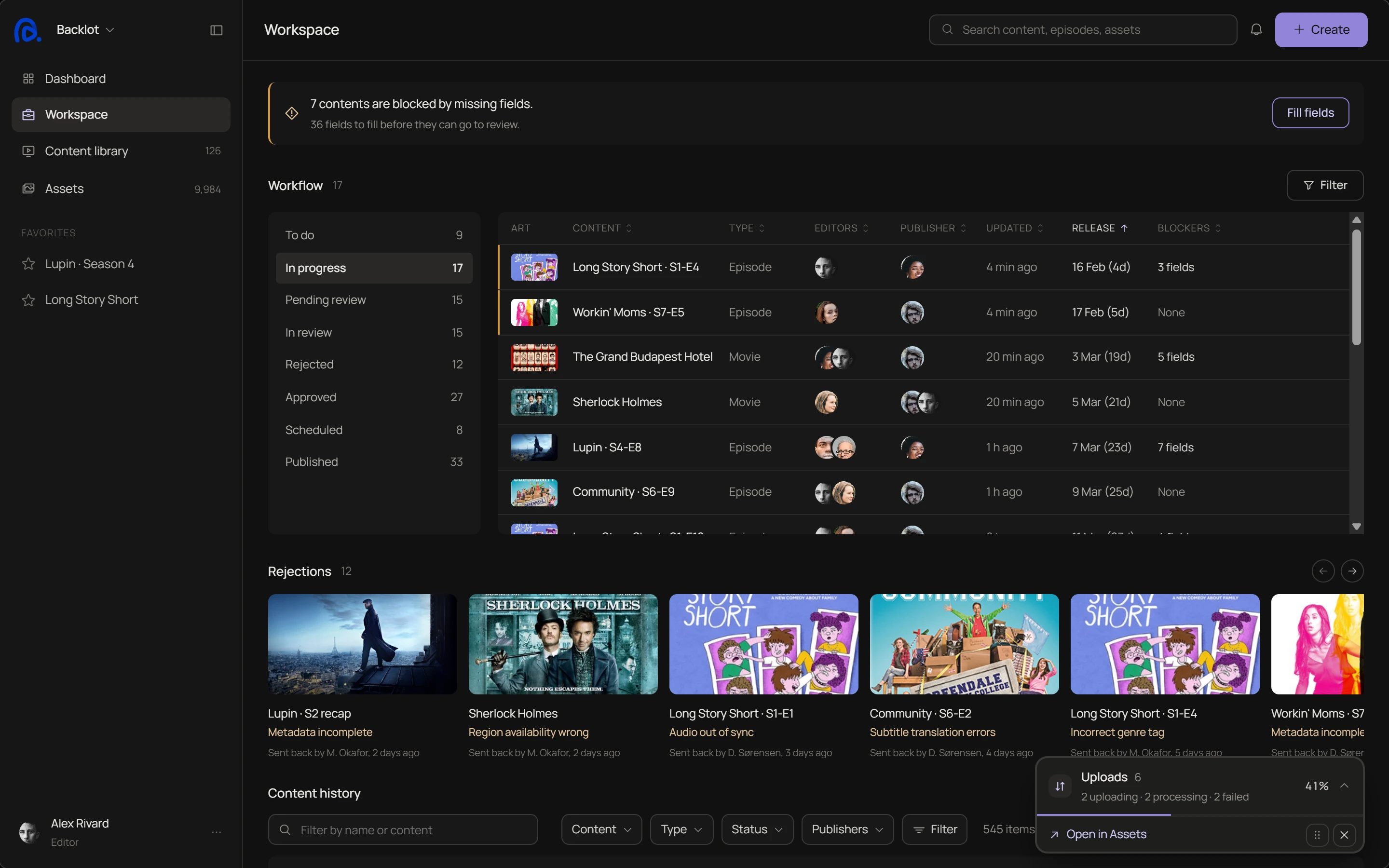
Uploading and processing are separate states, and the wait is explained
One line reports the result: 24 uploaded, 9 assigned automatically, 15 need the editor
The drop zone stays, so files can be added mid-upload
Editor workspace with the background uploads panel minimized in the corner

Uploads run in the background. The panel folds into the corner and the editor keeps working.

Assets

A ready file and an approved episode are not the same kind of true.

Files have their own states (Uploading, Processing, Ready, Needs assignment, Failed), kept apart from workflow status
The transfers panel follows the editor to every page
Group by Content only. Language and Type are already filters
Episode

The page answers one question: what is left to do?

“Needs your input” sits above everything the upload already settled
Verified values can never be edited. Source values unlock one field at a time
Submit for review is a state change in the page. Save is a form action in the footer
Episode 2 metadata page: fields that need input, fields from the delivery, and values read from the media
AI check

Before the editor submits, the page flags what this team's publishers usually send back.

It learns from rejection reasons. Every reason carries a field and a category, so they can be counted per team and per region
Each flag names its rule or its suspicion. Confident means a known rule is broken, uncertain means a pattern worth a second look
The AI writes nothing on its own. A flag opens its field, or gets dismissed with a reason that stays on record
Needs attention panel with three AI flags: age rating is blocking, Spanish localisation incomplete, genre may be wrong
05

The publisher's side

The publisher approves an item, or sends it back with reasons the editor can act on one by one.

Publisher flow

PublisherSystem
Open thereview queueSelect an itemclosest to releaseAutomatic checksshow what is filledReview metadata,artwork and ratingsAnythingwrong?Flag the field:category and noteSend back,confirm recipientEditor gets onetask per reasonYesApprove, statusbecomes ApprovedReleased toschedulingNo
Rejection flow

A rejection is a list of fixes, each pinned to its field.

The publisher comments on the metadata row itself. Each comment becomes a reason that carries its field and a category
Flagged rows stay marked on the page, so the editor fixes them in place instead of searching
Reasons resolve one by one. Reject counts them, names who gets the item back, and asks for confirmation first
A flagged field can be unflagged, because publishers are sometimes wrong too

The label that gave it away

The first version allowed one rejection reason per item, and I caught myself labelling rejected items “Multiple Issues”. That label was a symptom, not a reason, so reasons became a list, each pinned to a field and resolvable on its own.

Publisher flow, first version

Open dashboardSelectan episodeReviewFinds an incorrectsegment tagClick RejectSelect a reason(mandatory)Fill ina commentContent goes backto the editor
First version: rejecting opens a small modal with a single reason, set to Multiple Issues, and a free text note
Before
Current version: two rejection reasons in a side sheet, each pinned to a flagged field with its own category
After
Review

Checks only prove the fields are filled. Judgement on ratings, artwork and sync is yours.

Edit request

Approved content changes for a new reason, not because of a mistake.

Once review starts, content is locked. Changes go through an edit request, not a reopen
It covers new information from outside, like an updated regional age rating, never a mistake in approved work
06

Design system

Eight states, one icon family.

Status tells you where the work is. Availability tells you what viewers can see. Two layers, and availability is never a ninth status.

Workflow status

To doIn progressPending reviewIn reviewApprovedScheduledPublishedRejected

Availability

On airEndedExpired

On air: still releasing. Ended: complete and still watchable. Expired: rights window closed, data kept. Shown only in the content library and title headers.

Only the release date earns a spine.

The release date is the only thing the team cannot move, so it is the only thing that raises urgency.

Art
Content
Status
Release
Lupin · S4-E2
In review
14 Feb (2d)Within 7 days: amber spine
Community · S6-E6
Approved
10 Feb (2d overdue)Past release, not Published: red spine
Long Story Short · S1-E3
Pending review
8 Mar (24d)More than 7 days out: no spine
Driven by days until release, never by row position or waiting time. The status chip stays the same.
Verified means measured. Source means asserted.

Only a source value can be wrong, so only a source value can be unlocked.

Verified
Runtime
24:31
Read from the media file. Cannot be edited.
Source
Genre
Crime · Drama
From the delivery. Unlock to edit.
Suggested
Keywords
Heist, Paris, revenge
Proposed by the system. Nothing is written until you accept.
Manual
Localised title (ES)
El collar de la reina
Typed by an editor. Pinned against the next delivery.
A reason, never a score.

A score gives the editor nothing to act on. A named reason does, and every dismissal is kept.

Confident
Age rating is blocking
Spain deliveries reject an episode without a rating.
AI · confident
Uncertain
Genre may be wrong
The delivery says Crime. The synopsis and cast suggest Thriller might fit better.
AI · uncertain
Dismissed
ES localisation incomplete
Title and synopsis fall back to French in the Spain catalogue until both are written.
Dismissed by you · French is the agreed fallback this season
Permissions change the component, not the page.
Editor · Alex Rivard
Publisher · Maya Okafor
EditableIn progress
Age rating
12
Editable until the editor submits.
Age rating
12
Visible, not editable. Nothing to review yet.
Locked once review startsIn review
Age rating
12
The same row, locked while Maya Okafor reviews.
Age rating
12
Add comment
The review row from the publisher review screen. Add comment appears on hover or keyboard focus.
Read-onlyApproved
Age rating
12
Approved and locked. No per-field unlock.
Age rating
12
Approved 3 Feb by Maya Okafor. Locked here too.
Edit requestApproved
Season detailsRequested
Edit requested · waiting for Maya Okafor
Age rating
12
One Unlock per section. It sends a request, not an edit.
Age rating
12
The request reaches Maya Okafor. The section stays locked until she reopens it.
Primary action
DashboardCreateContent pageUploadIn progressSubmit for review
One primary per view: Create on dashboards, Upload once a content is open, Submit for review in the page body.
In review
RejectApprove
ApprovedPublish
One primary per view: Approve while reviewing (Reject beside it, same height), Publish once approved.
Every reason is pinned to a field.
1Age ratingCompliance
Rating is set to 12 but the French classification for this title is 16. Please correct before resubmitting.
Attached field, category and a note. Each reason lands separately; the editor’s Fix opens the first one.
Readiness is a count, not a pass or fail.
FR
Readiness in France
4 of 8 ready
What has to be true before Season 4 can be scheduled for France (FR).
Automatic checks
Metadata complete5 / 8
Age rating set7 / 8
Local language track8 / 8
Regional artwork3 / 3
Rights window covers premiereto 2031
Each check shows how many episodes meet it in the selected region. Amber marks the ones still short.
A field changes its edge, never its shape.
Default
Localised title (ES)
El collar de la reina
Value set. Quiet edge.
Hover
Localised title (ES)
El collar de la reina
The edge lifts one step.
Focus
Localised title (ES)
El collar de la reina
Accent edge and a 3px tint ring.
Disabled
Localised title (ES)
El collar de la reina
Loses its colour and its pointer.
Error
Localised title (ES)
 
Required for Spain
Red stops the work and says why.
Loading
Localised title (ES)
Reading metadata
Accent spinner and the step it is on.
Empty
Localised title (ES)
Type the Spanish episode title
The placeholder says what to type.
Every colour stands for one thing.

Published has no hue, because most of the library ends up there. Amber and red mean urgency, nothing else.

Colour by meaning
Status
One hue per status, except Published, which stays neutral. Never accent, never amber.
Provenance
Measured and asserted share a quiet edge. Suggested gets an accent edge and a sparkle. Manual lifts one step.
AI
Accent 300 ink and the 12% tint. A proposal, never a fill.
Urgency
Amber inside 7 days of release. Red once release has passed.
Type scale
36 fields28 / 500
7 contents20 / 500
Content library15 / 500
What is blocking13 / 500
Upload12.5 / 500
Body copy12 / 400
Secondary meta11 / 400
STATUS · UPDATED10 / caps
Manrope 400 and 500. Hierarchy comes from size and space.
Spacing scale
4
6
8
10
12
16
20
24
32
Nine steps. About 1,700 of the 2,000 spacing values in the screens already fit them unchanged.
Small on purpose: the whole system fits on one sheet.
34ComponentsEvery coded row on the sheet: buttons, chips, fields, headers, nav, overlays, warnings and patterns.
7Button variantsPrimary, secondary accent, compact, neutral, tertiary, icon and dropdown trigger.
25Colour tokensGrounds, lines, ink, accent and warning. Nothing outside them reaches a screen.
4Interaction statesHover, pressed, focus and disabled. The same four rules on every control.
Everything else lives in the full library.
Open the component libraryEvery component, token and state, with its row code.
07

What's next

Test it with editors. These decisions come from research and inference, not observation. I would test two things first: do the rejection categories cover what publishers actually send back, and do editors trust the split between fields they fill and fields the upload already filled.

Measure rejection rounds. If the pre-submit check works, the number of rounds per episode should drop. That is the first metric I would track.

Design what I scoped out. Unpublishing, bulk metadata editing and notification routing are each a small product of their own, and each one touches the same loop.

Research, flows, layouts and every product decision are mine. I used AI as a production tool, mainly to turn my screens into the animated walkthroughs on this page. The full system covers eight workflow states, three availability states, four field provenance treatments and three AI states.

Next project
UwaVerde→
NGO website
Currently looking for my next team
I'm open to new opportunities